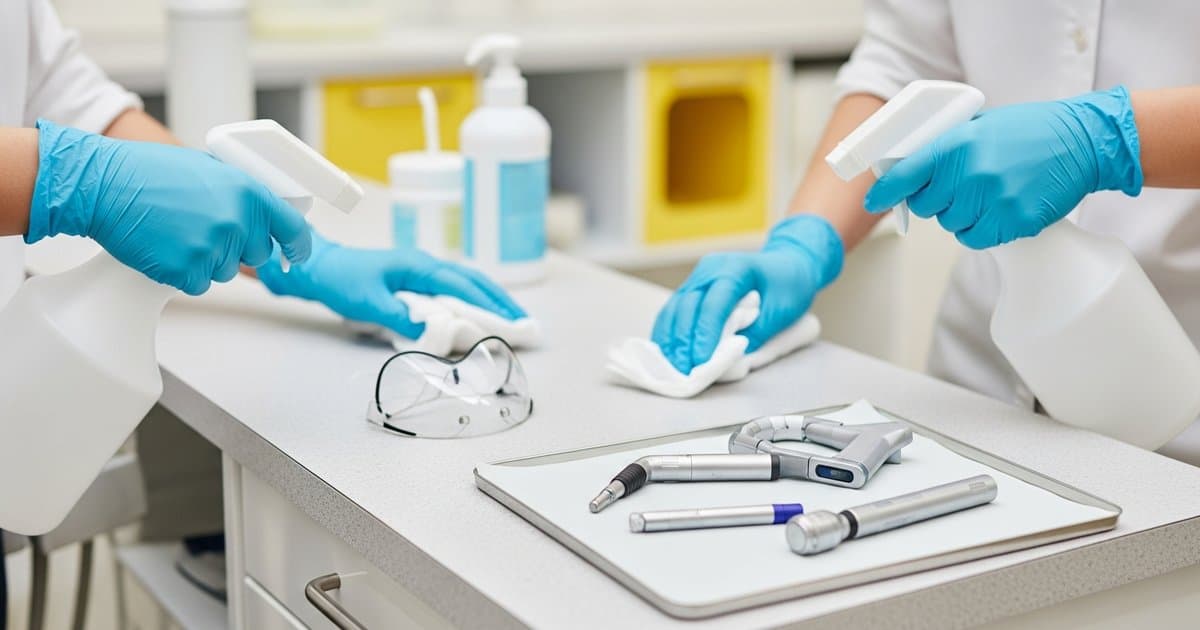
Maintaining proper infection control while protecting expensive digital imaging equipment presents unique challenges for pediatric dental practices. Digital sensors, intraoral cameras, and panoramic machines require specialized disinfection protocols that balance thorough pathogen elimination with equipment longevity. Unlike traditional film-based systems, these sensitive electronic devices demand careful consideration of cleaning agents, barrier protection, and handling procedures to prevent costly damage while ensuring patient safety. This comprehensive guide provides pediatric practice owners with evidence-based strategies for effectively disinfecting digital sensors and imaging equipment without compromising functionality or breaking infection control protocols.
Understanding Digital Sensor Vulnerabilities and Infection Control Requirements
Digital sensors represent one of the most vulnerable yet essential pieces of equipment in modern pediatric dental practices. These delicate devices contain sophisticated electronic components that can be permanently damaged by moisture, harsh chemicals, or excessive heat. The challenge becomes even more complex when treating pediatric patients, who may have higher salivation rates, difficulty controlling oral fluids, and increased anxiety that can lead to unexpected movements during imaging procedures.
The FDA classifies intraoral digital sensors as semi-critical devices, requiring high-level disinfection between patients. However, most digital sensors cannot withstand traditional sterilization methods like autoclaving, creating a dilemma for infection control protocols. The sensor's cable connections, joints, and seams provide potential entry points for pathogens and moisture, making proper barrier protection and careful disinfection techniques absolutely critical.
Pediatric practices face additional considerations due to the smaller patient population's higher risk of cross-contamination. Children's developing immune systems and the close contact nature of dental procedures necessitate even more stringent infection control measures. When selecting dental X-ray equipment for pediatric patients, practices must consider both the equipment's imaging capabilities and its compatibility with rigorous disinfection protocols.
Understanding the specific materials used in your digital sensors is crucial for selecting appropriate disinfectants. Most sensors feature plastic housings that may be sensitive to alcohol-based solutions or quaternary ammonium compounds. Some manufacturers specify particular cleaning agents or explicitly prohibit certain chemicals that could cause cracking, discoloration, or component failure.
Barrier Protection Systems: The First Line of Defense
Implementing comprehensive barrier protection represents the most effective strategy for protecting digital sensors while maintaining infection control standards. High-quality barrier covers create a protective barrier that prevents direct contact between the sensor and oral fluids, significantly reducing the risk of contamination and minimizing the need for aggressive disinfection procedures.
When selecting barrier covers for pediatric practices, consider products specifically designed for children's comfort and cooperation. Smooth, latex-free materials with rounded edges help reduce discomfort and anxiety during imaging procedures. Some barrier systems feature flavored options that can improve patient acceptance, particularly important when working with young or anxious patients.
Single-use, disposable barrier covers offer the highest level of protection and should be changed between every patient without exception. Look for covers that provide complete sensor enclosure, including the cable connection points where contamination commonly occurs. The barrier material should be thin enough to maintain image quality while providing robust protection against moisture and pathogens.
Proper barrier application technique is crucial for effectiveness. Ensure complete coverage of the sensor surface and cable, eliminating air bubbles that could compromise the barrier integrity. Train all staff members on correct application and removal procedures, emphasizing the importance of avoiding cross-contamination during the process. Remove barriers immediately after use using aseptic technique, being careful not to touch the sensor surface with contaminated gloves.
Consider double-barrier systems for high-risk patients or procedures involving significant oral fluid exposure. This approach provides additional security and allows for safe barrier removal without risking sensor contamination. While this increases supply costs, it significantly reduces the risk of expensive sensor damage or replacement needs.
Selecting Appropriate Disinfectants and Cleaning Agents
Even with proper barrier protection, digital sensors require regular disinfection to maintain infection control standards. Selecting the right disinfectants requires careful consideration of both antimicrobial efficacy and material compatibility. Many traditional dental disinfectants can damage sensitive electronic components, making manufacturer-specific recommendations essential.
EPA-registered disinfectants with proven efficacy against a broad spectrum of pathogens, including bacteria, viruses, and fungi, provide the foundation for effective sensor disinfection. However, not all EPA-registered products are suitable for electronic equipment. Avoid disinfectants containing high concentrations of alcohol, phenolic compounds, or hydrogen peroxide, which can cause plastic degradation and electronic component failure over time.
Quaternary ammonium-based disinfectants often provide the best balance of antimicrobial efficacy and material compatibility for digital sensors. These products typically offer excellent pathogen kill rates while being gentler on plastic and electronic components. Look for low-alcohol or alcohol-free formulations specifically designed for sensitive equipment disinfection.
For practices seeking comprehensive guidance on disinfectant selection, our surface disinfectants for dental offices comparison guide provides detailed analysis of various product categories and their applications. This resource can help identify products suitable for both general surface disinfection and specialized equipment cleaning.
Pre-cleaning steps are crucial before disinfectant application. Remove visible debris and organic matter using manufacturer-approved cleaning solutions or sterile saline. Organic material can interfere with disinfectant effectiveness and may contribute to sensor degradation over time. Use lint-free cloths or wipes to prevent fiber residue that could interfere with image quality or sensor function.
Always follow manufacturer contact time recommendations for disinfectants. Insufficient contact time may not achieve adequate pathogen kill, while excessive exposure can damage sensor components. Use a timer to ensure consistent contact times and train staff on proper application techniques to avoid oversaturation that could allow liquid penetration into sensitive areas.
Proper Handling and Storage Protocols
Developing standardized handling and storage protocols helps prevent contamination while protecting expensive digital sensors from accidental damage. These protocols become particularly important in pediatric practices where multiple staff members may handle imaging equipment throughout the day.
Establish designated clean and contaminated zones within your operatories to prevent cross-contamination during sensor handling. Use color-coded containers or trays to clearly identify clean sensors ready for use versus contaminated sensors requiring disinfection. This visual system helps prevent accidental use of contaminated equipment and ensures proper workflow management.
Implement a buddy system or verification process for sensor disinfection to ensure protocols are consistently followed. Have staff members confirm barrier application, disinfection completion, and proper storage before sensors are returned to service. This redundancy helps catch potential errors that could compromise infection control or equipment integrity.
Proper storage conditions are crucial for maintaining sensor functionality and preventing contamination. Store disinfected sensors in clean, dry environments away from potential sources of contamination. Avoid storage areas with high humidity, temperature extremes, or direct sunlight that could affect sensor performance or promote microbial growth.
Consider investing in UV sanitizing cabinets designed for dental instruments and equipment. These systems provide an additional layer of disinfection while offering organized storage solutions. However, verify manufacturer approval for UV exposure before implementing this storage method, as some sensors may be sensitive to UV radiation.
Cable management represents a critical aspect of sensor handling protocols. Cables are often the most vulnerable part of digital sensor systems, susceptible to damage from kinking, stretching, or chemical exposure. Use cable management systems that prevent stress on connection points and ensure cables are properly cleaned and disinfected along with the sensor head.
Equipment-Specific Considerations and Maintenance
Different types of digital imaging equipment require tailored disinfection approaches based on their design, materials, and intended use. Understanding these specific requirements helps optimize infection control protocols while preventing equipment damage.
Intraoral sensors demand the most stringent disinfection protocols due to their direct contact with oral tissues and fluids. These devices typically feature more robust construction to withstand repeated disinfection cycles, but still require careful handling to prevent moisture ingress. Pay special attention to sensor tips and cable connection points where contamination commonly accumulates.
Phosphor plate systems require different considerations than direct digital sensors. The plates themselves are typically single-use items that don't require disinfection, but the scanning equipment and handling accessories need regular cleaning and disinfection. Follow manufacturer guidelines for cleaning scanner components and ensure proper ventilation when using chemical disinfectants near sensitive optical equipment.
Panoramic and cephalometric imaging equipment presents unique challenges due to their size and complexity. These systems often incorporate multiple materials and components that may require different disinfection approaches. Focus on high-touch surfaces and patient contact areas while being careful to avoid sensitive electronic components and calibration mechanisms.
Intraoral cameras represent another category requiring specialized attention. These devices often feature removable tips or covers that can be sterilized separately from the main unit. When possible, use autoclavable tips or covers to achieve the highest level of sterilization. For non-autoclavable components, implement high-level disinfection protocols using manufacturer-approved agents.
Regular maintenance schedules should incorporate deep cleaning and disinfection procedures beyond routine patient-to-patient protocols. Weekly or monthly deep cleaning helps remove accumulated residue and ensures optimal equipment performance. Document these maintenance activities to demonstrate compliance with infection control standards and equipment warranty requirements.
How TGP Can Help
The Group Practice (TGP) understands the unique challenges pediatric dental practices face in balancing infection control requirements with equipment protection and cost management. Through our specialized group purchasing organization, pediatric practices can access premium barrier covers, compatible disinfectants, and cleaning supplies at significantly reduced costs, typically saving 20-30% compared to individual practice purchasing.
Our procurement specialists work directly with leading manufacturers of dental disinfectants and barrier systems to negotiate volume discounts while ensuring product quality and compatibility with popular digital sensor brands. This partnership approach allows smaller pediatric practices to access the same high-quality supplies used by large dental groups while maintaining their independence and personalized patient care approach.
TGP's infection control supply program includes comprehensive product training and protocol development support. Our team helps practices identify the most cost-effective barrier and disinfection systems for their specific equipment mix while ensuring compliance with current CDC and ADA infection control guidelines. This support is particularly valuable for pediatric practices that may have unique equipment requirements or patient population considerations.
Additionally, TGP provides access to bulk purchasing programs for high-use items like barrier covers and disinfectant wipes, helping practices maintain adequate inventory levels while minimizing storage requirements and cash flow impact. Our automated ordering systems can help ensure you never run out of critical infection control supplies that could compromise patient safety or force expensive equipment cleaning procedures.
Key Takeaways
• Implement comprehensive barrier protection systems as the primary defense for digital sensors, using pediatric-appropriate covers that enhance patient comfort
• Select EPA-registered disinfectants specifically compatible with your digital sensor materials, avoiding harsh chemicals that may cause equipment damage
• Establish clear protocols for sensor handling, disinfection, and storage to ensure consistent infection control and prevent costly equipment failures
• Train all staff members on proper barrier application, disinfection procedures, and manufacturer-specific requirements for each piece of imaging equipment
• Consider equipment-specific needs when developing disinfection protocols, recognizing that different digital imaging devices may require tailored approaches
• Maintain detailed documentation of disinfection procedures and equipment maintenance to demonstrate compliance and support warranty claims
• Invest in proper storage solutions that protect sensors from contamination and environmental damage while maintaining organized inventory
• Regular review and update of disinfection protocols to reflect new equipment, changing regulations, and evolving best practices in pediatric dental infection control
Frequently Asked Questions
Can I use the same disinfectant wipes for both surfaces and digital sensors?
Not necessarily. While some disinfectants are safe for both applications, digital sensors often require gentler formulations than general surface disinfectants. Many surface disinfectants contain higher alcohol concentrations or harsh chemicals that can damage sensitive electronic components over time. Always check your sensor manufacturer's approved disinfectant list and consider using specialized equipment-safe disinfectants for your digital sensors while using standard surface disinfectants for operatory surfaces. This approach may require stocking two different products but provides optimal protection for expensive equipment while maintaining effective infection control.
How often should I replace barrier covers during long procedures or multiple images on the same patient?
Barrier covers should remain in place for the entire imaging session with a single patient, regardless of the number of images taken. However, if a barrier becomes visibly soiled, torn, or compromised during the procedure, it should be immediately replaced using proper aseptic technique. For extended procedures involving multiple imaging sessions separated by significant time intervals, consider replacing barriers between sessions as an added precaution. The key principle is maintaining barrier integrity throughout each patient encounter while avoiding unnecessary waste from excessive barrier changes.
What should I do if liquid disinfectant accidentally gets inside my digital sensor?
If liquid penetrates your digital sensor, immediately power down the system and disconnect the sensor if possible. Do not attempt to use the sensor or check its function until it has been thoroughly dried and inspected. Contact your sensor manufacturer immediately for guidance, as attempting to use a moisture-compromised sensor can cause further damage. Document the incident for warranty purposes and consider having the sensor professionally inspected before returning it to service. This situation underscores the importance of proper barrier use and careful disinfectant application to prevent moisture exposure to sensitive components.